


How does Auk pick the best moments and make clips?
Auk transcribes your video, reads the whole transcript, and marks moments that work on their own as a clip. It scores every moment from 0 to 100, keeps the best, and cuts each into a vertical clip with captions, framed on the people speaking.
What are the steps on the project page?
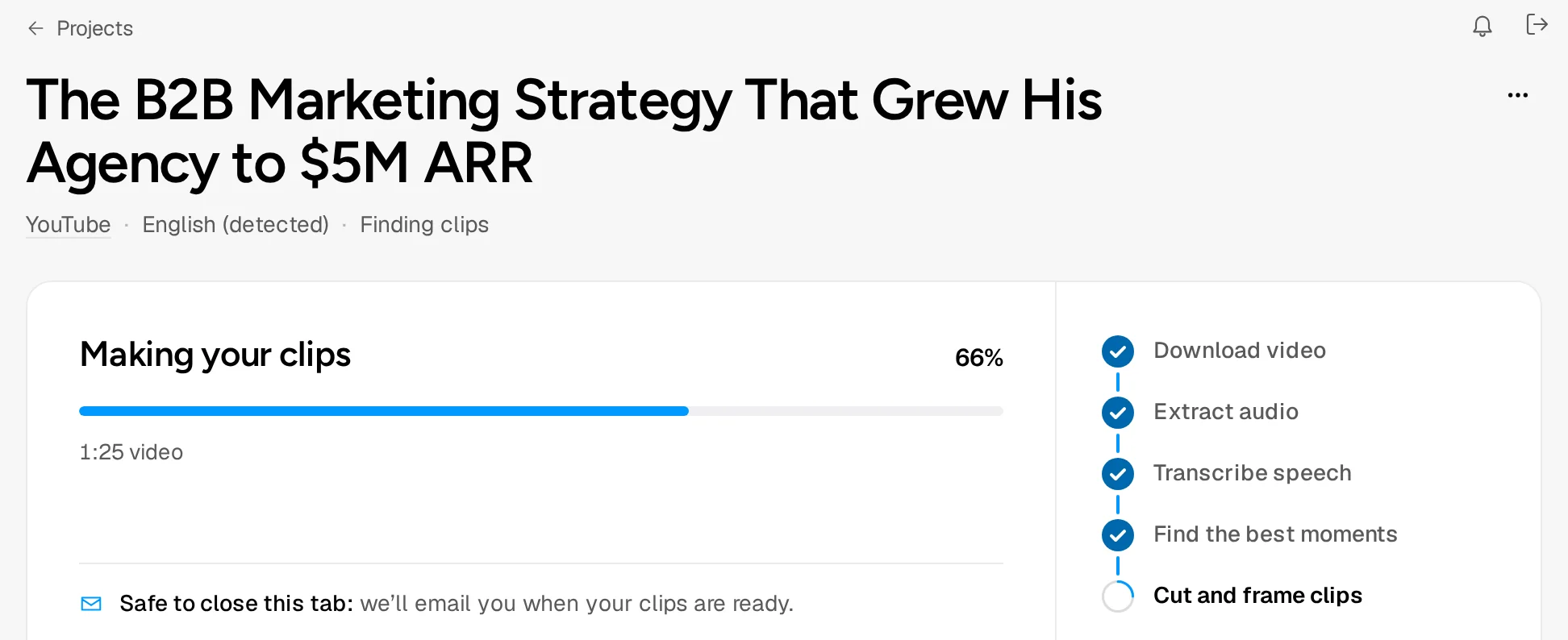
The Making your clips card shows a percentage and five steps:
- Download video: Auk fetches the video from YouTube. For an upload this step reads Process upload.
- Extract audio: the soundtrack is separated from the picture.
- Transcribe speech: every word is written down with its timing. With Language on Auto, Auk detects the language from the first minutes of speech and transcribes the whole video in it. The project page shows the language under its title.
- Find the best moments: Auk picks the moments worth clipping from the transcript.
- Cut and frame clips: each moment is cut and reframed to vertical. See How reframe works.
Once the moments are found, a placeholder tile with each moment's title and tags appears under the card, and turns into a playable clip when that clip is ready.
How does Auk decide which moments to clip?
From what is said. Auk first reads the full transcript to learn what the video is about, then finds moments that make sense without the rest of the video, each with a title and topic tags. All of them are then scored together from 0 to 100, and the highest scoring ones are kept, skipping any that mostly repeat another.
The score shows under each clip, for example Score 86. It rates the moment as a clip; it does not predict views.
How many clips will I get, and how long are they?
It depends on the video: only moments that score well enough are kept, so two videos of the same length can give different counts.
Length follows the Clip length option you chose. Auto lets Auk choose; the other options, with their ranges, are listed in the menu.
What if something goes wrong?
- Taking a bit longer than usual, on the project's card on Home: a step hit a temporary problem and Auk is retrying it by itself. Nothing for you to do. On the project page, a retry of the moment search reads Retrying clip selection with the attempt number.
- No clips this time. No moment scored well enough. Try again runs the video again; for a YouTube link that is charged like a new video.
- Something went wrong. The project failed and your credits come back: see Credits for failed projects. Try again (or Retry clip selection) runs it again.
Related
- How do I make my first clips with Auk?Paste a YouTube link or upload a video file, pick a caption style and the part to use, and press Make clips. Which videos work and what it costs.
- How do I watch, favorite and download my clips?Your clips appear on the project page. Click one to play it, add it to favorites, open it in the editor, or download the MP4.
- How does Auk turn a horizontal video into a vertical clip?Auk crops each clip to 9:16 and follows whoever is talking. For several people, a screen with a webcam, or nobody in frame, it switches layout.
- Do I get my credits back if a project fails?Yes. When Auk cannot make clips from your video, every credit that project charged comes back automatically. Here is how to see the refund.