


How does Auk turn a horizontal video into a vertical clip?
Auk crops each clip from your wide video to a vertical 9:16 frame and moves the crop to follow whoever is talking. It decides shot by shot: when a shot has nobody to follow, or several people share it, it uses a different layout instead of a single crop.
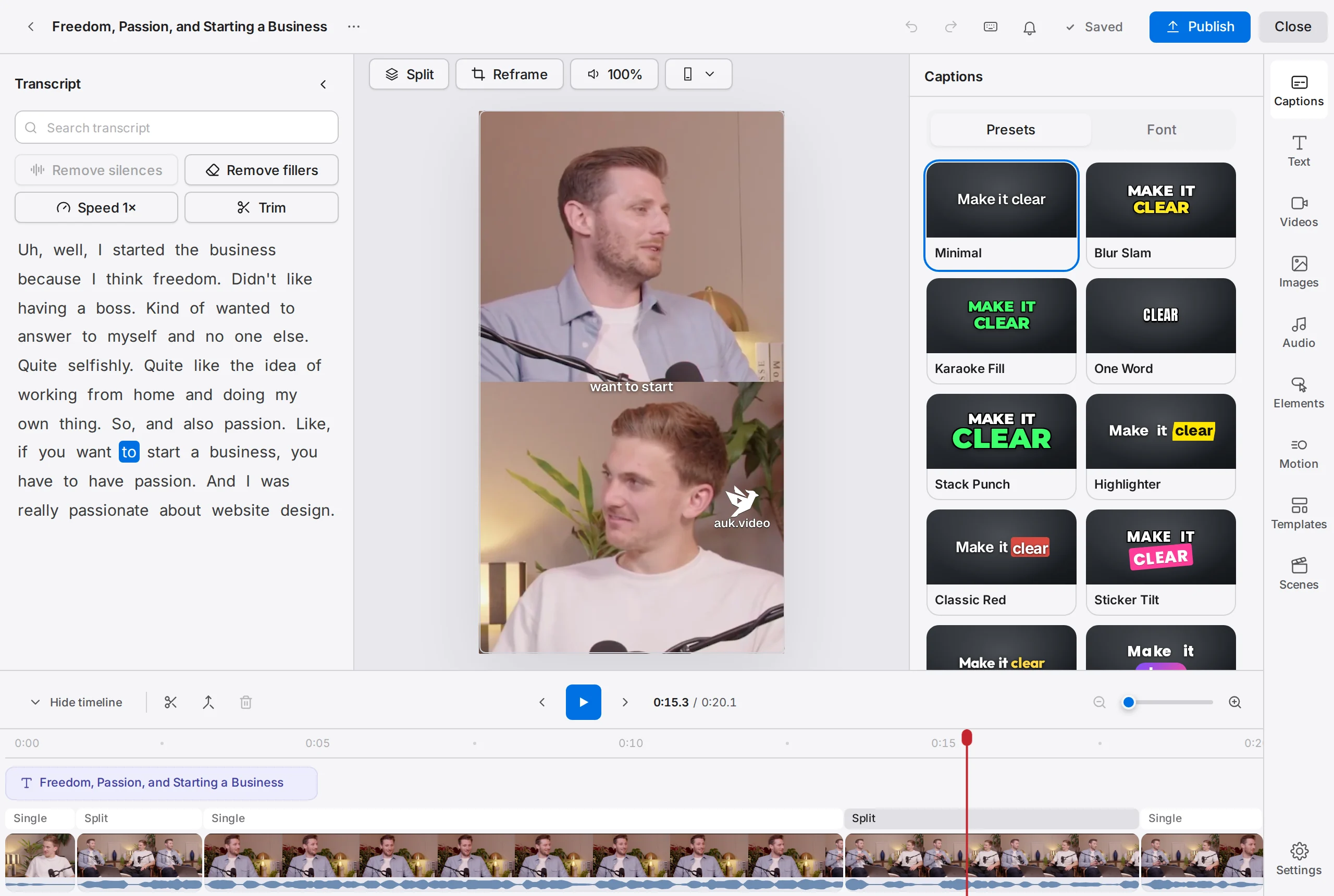
Footage: The B2B Marketing Strategy That Grew His Agency to $5M ARR by Success Clues Podcast, CC BY 4.0, cropped and captioned.
How does Auk know who is talking?
It finds the faces in each shot and matches them against the audio to tell who is speaking at each moment. The crop follows that person smoothly, and starts fresh at each cut instead of sliding across it.
What are the layouts?
Each clip is split into segments, and each segment has one layout, shown as a labelled chip on the editor timeline.
| Layout | What it shows | Picked by Auk today? |
|---|---|---|
| Single | A vertical crop that follows one person | Yes |
| Fit | The whole wide frame, with the space above and below filled | Yes |
| Split | Two people, one above the other | Yes |
| Three | One wide box over two narrower ones | Yes |
| Four | Four people in a 2x2 grid | Yes |
| Facecam | One person in a small band over the rest of the frame | Yes, for a webcam over a screen |
A floating picture-in-picture box can sit over any of them. Auk adds one itself for a round webcam, or one too small for a band; you can add your own in the editor.
When does Auk use Fit instead of a crop?
When a shot has no face to follow, such as a slide, a screen recording or b-roll. A narrow crop would cut away what matters, so Auk shows the whole frame.
What does Auk do with a screen recording, slides or a game?
When a shot shows a screen with a webcam over it, as in a stream, a tutorial or a talk with slides, Auk uses Facecam: the person in a small band at the top, the screen below. The screen part follows where the picture changes, so the text or action being talked about stays in view. A round webcam, or one with a very small face, floats as a round picture-in-picture over the screen instead, kept away from the bottom right corner where TikTok, Reels and Shorts put their buttons.
A vertical video between two blurred bars, such as a phone game recorded in landscape, is cropped to the vertical part.
When does Auk use Split, Three or Four?
When two, three or four people of similar size share a shot for most of it. Each person gets a box; someone much smaller in the background does not count.
Two people sitting shoulder to shoulder share one box instead, because cropping them apart would cut one picture in two or leave each face filling its box. So three people with such a pair get a Split: the pair together in one band, the third person in the other, and whoever is speaking on top.
What if Auk frames the wrong person?
Change the layout, choose who fills each box, or drag the crop in the editor: see Adjusting the crop.
Related
- How do I fix the crop or framing of a clip?Change a segment's layout, drag the crop onto the right person, put a person, a video or an image in each box, or show the whole frame, all in Reframe.
- How does Auk pick the best moments and make clips?Auk transcribes your video, finds moments that work on their own, scores them from 0 to 100, and cuts the best into vertical clips. Each step explained.
- How do I watch, favorite and download my clips?Your clips appear on the project page. Click one to play it, add it to favorites, open it in the editor, or download the MP4.