


How do credits work in Auk?
One credit covers one minute of the video you give Auk, charged once when you start it. If you pick a Section of the video, only that part counts. Every clip Auk makes from that video, your edits, downloads and publishing are free.
How many credits does a video cost?
Its length rounded to the nearest minute, with a minimum of 1 credit. The number of clips does not change the price.
To pay for less of a long video, pick a Section in the Make clips window: drag the handles or type a Start time and End time. Auk then looks for clips only in that part, and the price is that part's length. A 2 hour video with a 10 minute section costs 10 credits.
| Source video or section length | Credits |
|---|---|
| 20 seconds | 1 |
| 1 minute 29 seconds | 1 |
| 1 minute 30 seconds | 2 |
| 10 minutes 29 seconds | 10 |
| 45 minutes | 45 |
When are credits taken?
When you press Make clips. The window shows the cost and your balance first, for example 12 credits · 30 left. If your balance is too low, the button reads Not enough credits and nothing is charged.

That first charge uses the length Auk can read before processing. Once Auk has measured the video, the difference is settled: extra credits come back (Shorter than estimated in your history) or the rest is charged (Longer than estimated). If your browser cannot read an uploaded file's length, Auk charges 1 credit to start and settles the rest the same way.
Settling a longer video can take your balance below zero. That video still finishes, but you cannot start another until your balance covers it.
What is free?
Once a video is paid for:
- every clip Auk makes from it
- editing clips
- rendering and downloading, as often as you like
- publishing to TikTok, YouTube Shorts or Instagram Reels
Pasting the same YouTube link again after its project has finished starts a new project, charged like any other video.
What happens to my credits if a project fails?
They all come back automatically: see Credits for failed projects.
Where can I see my balance?
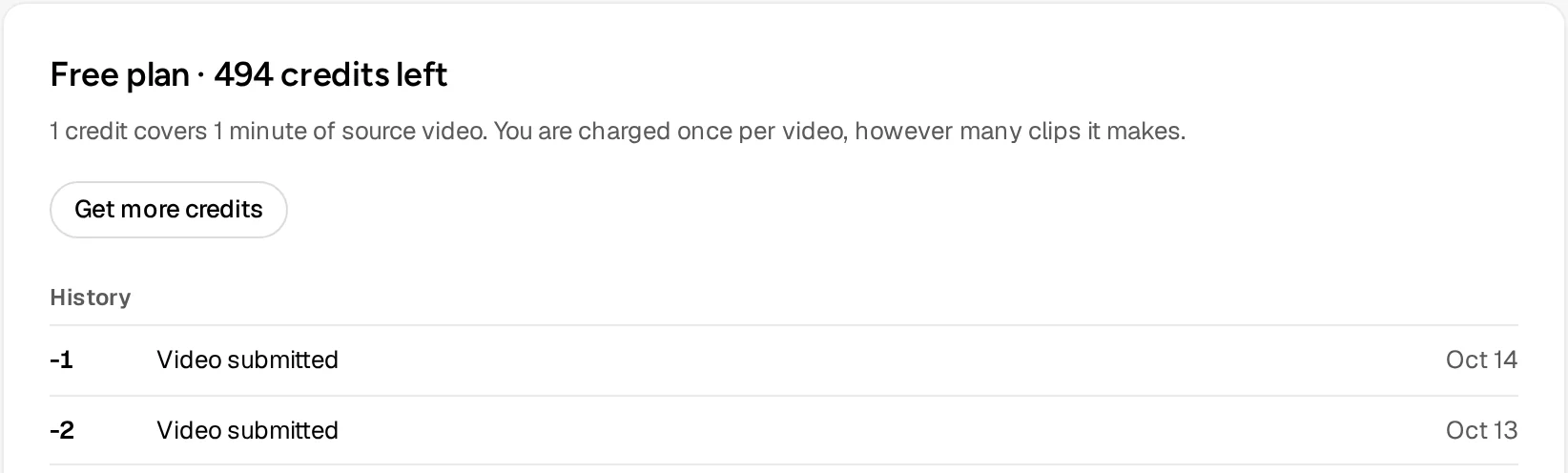
Under your name at the bottom of the sidebar, and on Home under the paste field, which also says how many minutes of video it covers. For the history, click your name, choose Profile and look at History on the plan and credits card. It lists every change, such as Video submitted, Shorter than estimated, Longer than estimated, Refunded, processing failed and Credits added.
How do I get more credits?
- At sign-up, a new account gets free credits once (30 today), with no card needed.
- With a paid plan: click your name and choose Get more credits, or press it on your Profile. It opens the pricing page, which lists what each plan adds.
- From the Auk team, shown in your history as Credits added.
Do credits expire?
No. Unused credits stay in your balance, and credits from a paid plan are added to what you already have.
Related
- Do I get my credits back if a project fails?Yes. When Auk cannot make clips from your video, every credit that project charged comes back automatically. Here is how to see the refund.
- How do I export and download a clip?Open the clip and press Download. Auk renders a vertical 1080 by 1920 MP4 with your captions, for free.
- How do I make my first clips with Auk?Paste a YouTube link or upload a video file, pick a caption style and the part to use, and press Make clips. Which videos work and what it costs.
- How does Auk pick the best moments and make clips?Auk transcribes your video, finds moments that work on their own, scores them from 0 to 100, and cuts the best into vertical clips. Each step explained.